
A handmade best-friend gift becomes much more personal when it combines photographs, music, and a small working mechanism. This project turns favorite friendship memories into a manual photo scroll frame inspired by a Spotify player. For another gift that presents personal photographs through a moving display, explore this rotating photo wheel tutorial.
The finished piece looks like a compact music card from the front, but inside it has two vertical wooden rollers. A long paper strip containing photographs and matching song information is attached between those rollers. Turning either wooden dowel moves the strip horizontally from side to side , revealing a new photograph in the square window and its matching song title through the narrow opening underneath.
This version uses friendship photographs and songs chosen to represent different moments of a close friendship.
Table of Contents
- Tutorial
- Project Overview
- Materials and Tools
- Friendship Playlist for the Gift
- 1. Choose the Photos and Match the Songs
- 2. Cut the Main Cardstock Template
- 3. Prepare the Continuous Photo Strip
- 4. Decorate and Glue the Front Housing
- 5. Install the First Roller and Start the Photo Strip
- 6. Attach the Second Roller and Set the Tension
- Check the alignment before closing the frame
- 7. Close the Back and Finish the Gift
- How the Photo Scroll Mechanism Works
- Troubleshooting the Moving Photo Strip
- Important Assembly Details
- Making the Gift More Personal
Tutorial
Project Overview
| Detail | Recommendation |
|---|---|
| Difficulty | Intermediate paper craft |
| Active time | About 2–3 hours |
| Main material | 250–300 gsm textured cardstock |
| Moving strip | 120–160 gsm matte paper |
| Finished orientation | Portrait |
| Approx. front panel | 8 × 11 cm |
| Photo window | Approx. 5 × 5 cm |
| Song window | Approx. 5 × 0.8–1 cm |
| Wooden rollers | 6–8 mm diameter |
| Roller length | Approx. 13–15 cm |
| Adhesive | PVA glue and thin double-sided tape |
| Main skill | Accurate cutting, folding, alignment, and tension control |
The exact dimensions can be adjusted, but both rollers must remain parallel and the photo strip must move horizontally between them.
Materials and Tools
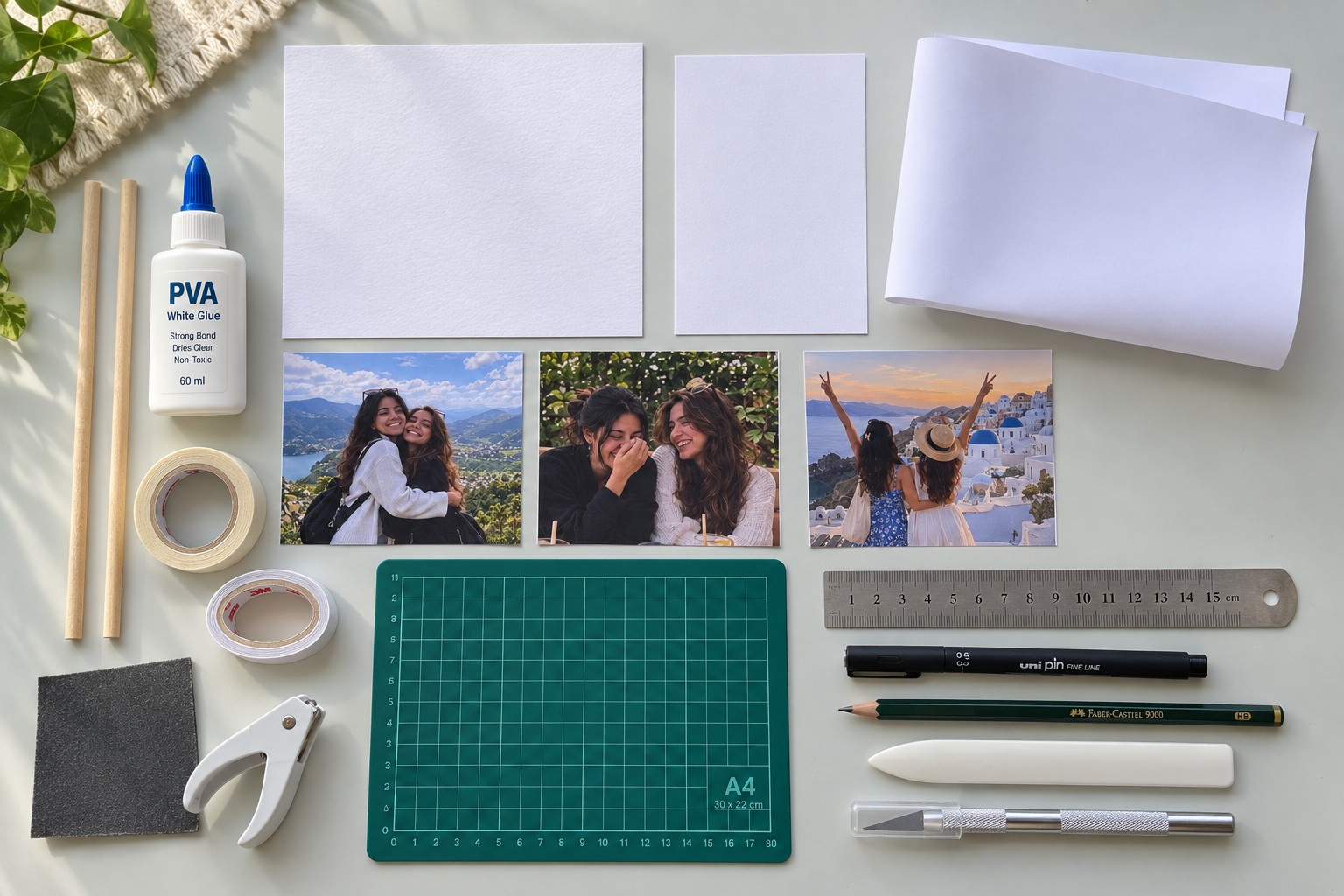
- 250–300 gsm white textured cardstock
- 120–160 gsm matte printing paper
- Two wooden dowels, approximately 6–8 mm diameter
- Favorite best-friend photographs
- Printed friendship song titles and artist names
- Printed Spotify Code for the playlist
- PVA craft glue
- Thin double-sided tape
- Masking or paper tape
- Metal ruler
- Pencil
- Fine black pen
- Craft knife
- Cutting mat
- Scissors
- Bone folder or scoring tool
- Hole punch sized to the wooden dowels
- Fine sandpaper if the dowels need smoothing
Before beginning the full project, place one dowel through a test hole in scrap cardstock. It should rotate freely without creating a noticeably loose opening.
Friendship Playlist for the Gift
The playlist can be customized, but the following tracks work well with the friendship theme:
- Count on Me — Bruno Mars
- You've Got a Friend in Me — Randy Newman
- Lean on Me — Bill Withers
- I'll Be There for You — The Rembrandts
- Thank You for Being a Friend — Andrew Gold
- Wannabe — Spice Girls
- Best Friend — Rex Orange County
- True Friend — Hannah Montana
Create the playlist in Spotify before printing the Spotify Code. Scan the printed code with a phone before attaching it permanently so you know it still works at the chosen size.
1. Choose the Photos and Match the Songs
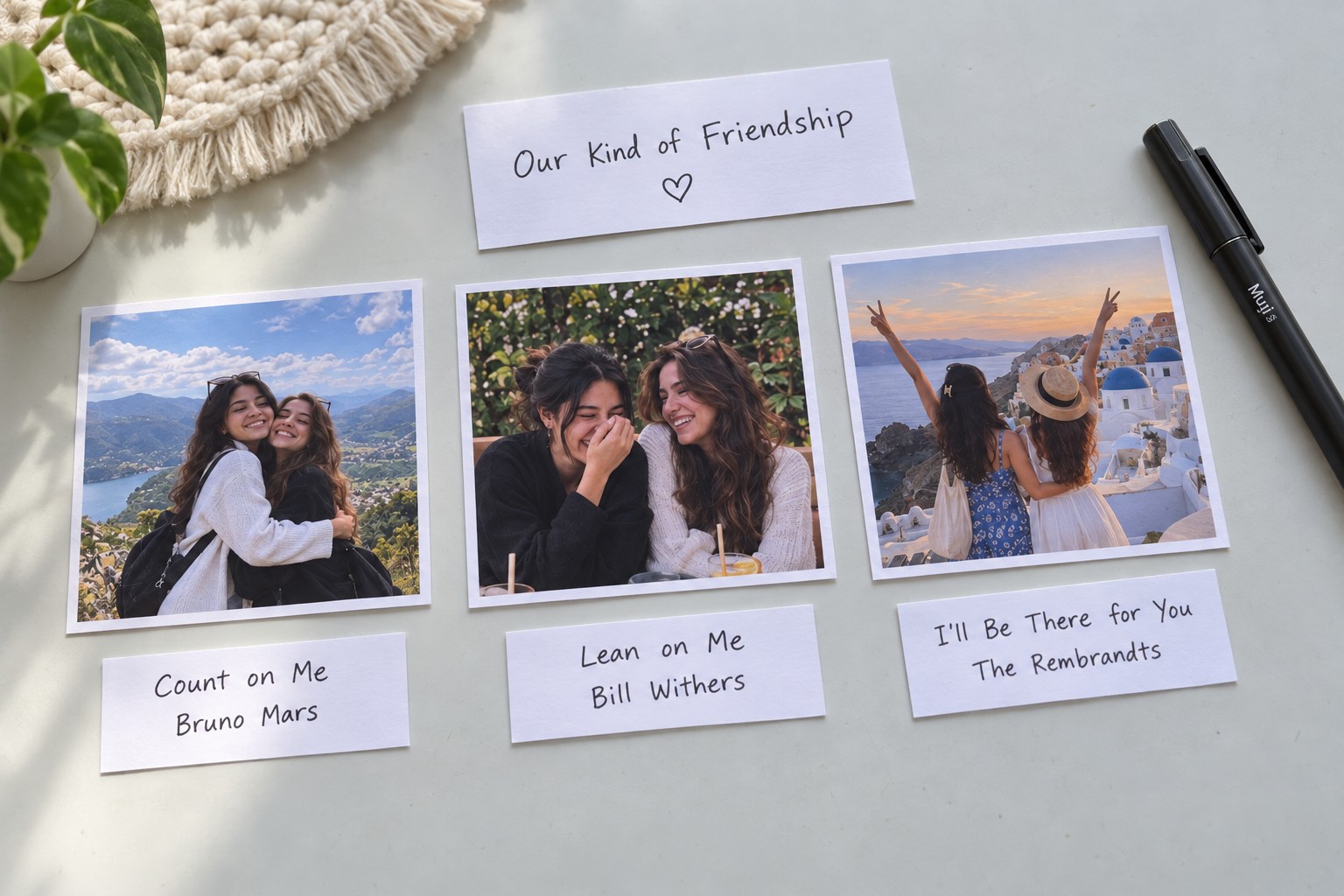
Start by selecting the memories that will appear inside the moving frame.
A strong sequence combines different types of friendship photographs rather than using nearly identical poses. For example:
- An outdoor photograph of both friends hugging
- A candid photograph of both friends laughing
- A travel memory
- A birthday or celebration
- A school or college memory
- A casual everyday photograph
Pair each photograph with one song.
For the first three memories, the sequence can be:
Photo 1: outdoor hug
Count on Me — Bruno Mars
Photo 2: laughing together
You've Got a Friend in Me — Randy Newman
Photo 3: travel memory
Lean on Me — Bill Withers
Crop the photographs to the same square ratio. Consistent dimensions are important because every image needs to pass through the same square opening.
Do not glue the photographs individually to the frame. They will ultimately become part of one continuous moving strip.
2. Cut the Main Cardstock Template
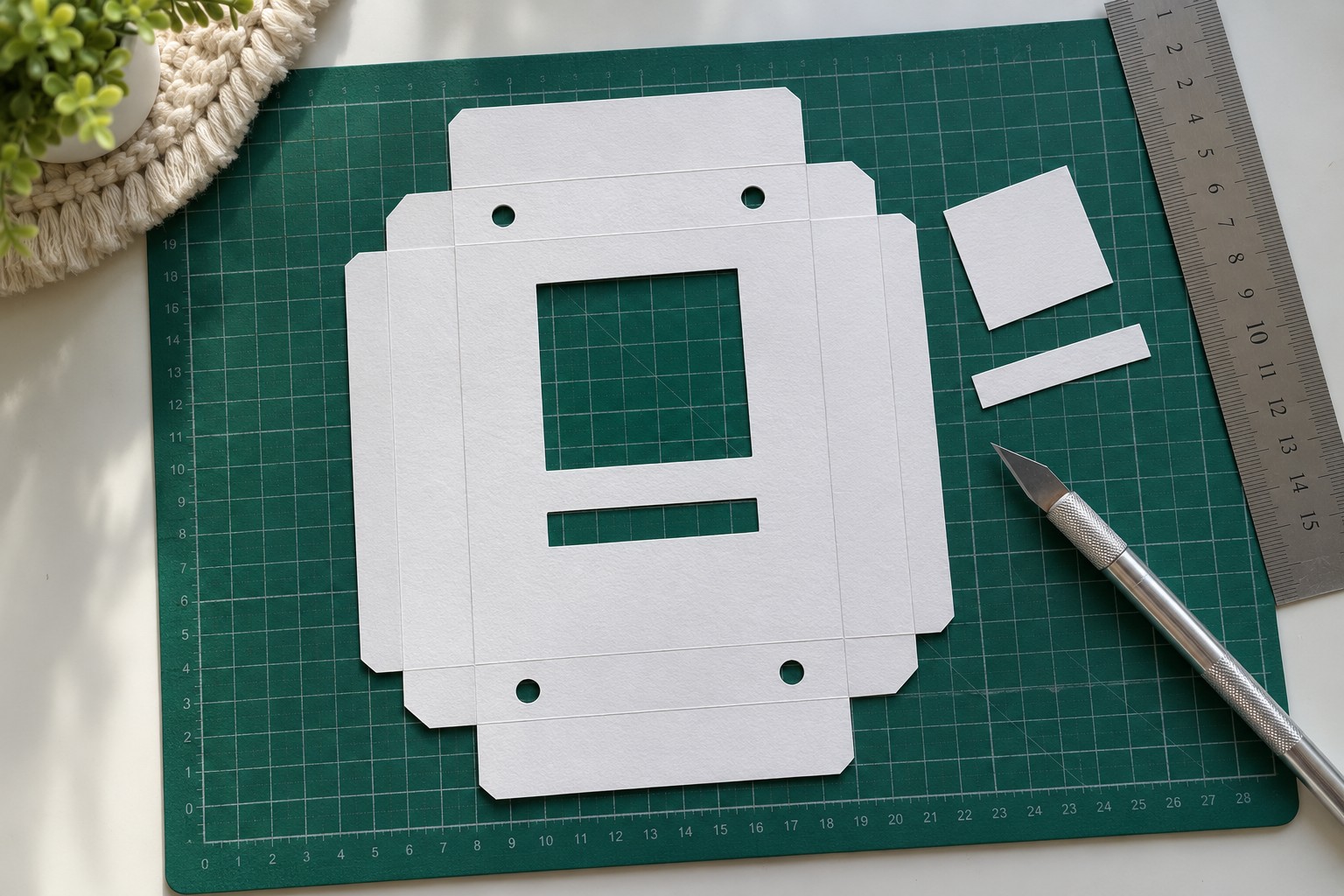
The frame is made from a single structured cardstock template that folds into a shallow box.
Mark the main portrait panel first. A practical finished size is approximately 8 × 11 cm , with extra cardstock extending around the panel to create the side walls and folding tabs.
Mark the following openings on the front:
- One centered square photo window, approximately 5 × 5 cm
- One narrow rectangular song window directly underneath
- Four roller holes, two near the top and two near the bottom
The left upper and lower holes must line up vertically. The same applies to the right pair.
This alignment determines whether the wooden rollers remain straight.
Use a craft knife and metal ruler to cut the square opening and narrow song slot. Punch the roller holes after cutting.
Score the wall folds before bending them.
The side sections should fold upward to create a shallow tray approximately 1–1.5 cm deep .
Do not permanently glue everything immediately. First dry-fold the cardstock and confirm that the sides meet cleanly.
3. Prepare the Continuous Photo Strip
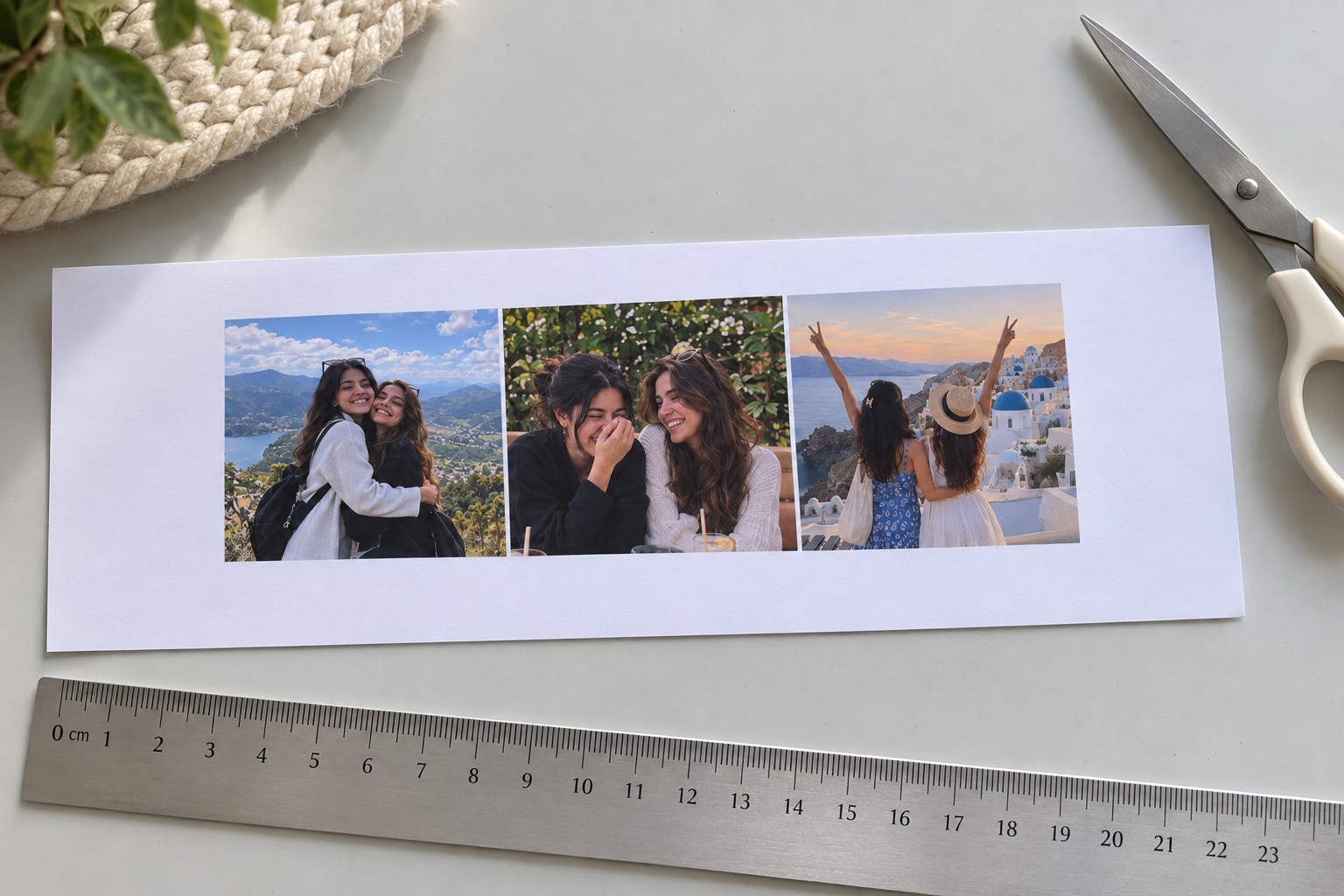
Print the photographs as one horizontal strip rather than separate loose prints.
Arrange the photographs side by side with consistent spacing.
Each section should contain:
- One square photograph
- The matching song title
- The artist name directly underneath or within the lower text area
For example:
Count on Me — Bruno Mars
You've Got a Friend in Me — Randy Newman
Lean on Me — Bill Withers
The strip must be tall enough for both the image area and song-title area to align with the two front openings.
Leave approximately 3–4 cm of blank paper at both ends . These blank leaders are required for attaching the strip to the rollers.
Trim the strip carefully with scissors or a craft knife and ruler.
Before proceeding, place the front template over the strip.
Move the strip horizontally underneath it.
When one photograph is centered in the square window, its corresponding song title should also appear in the narrow opening below.
If the photograph aligns but the song does not, adjust the printed layout before assembly.
4. Decorate and Glue the Front Housing
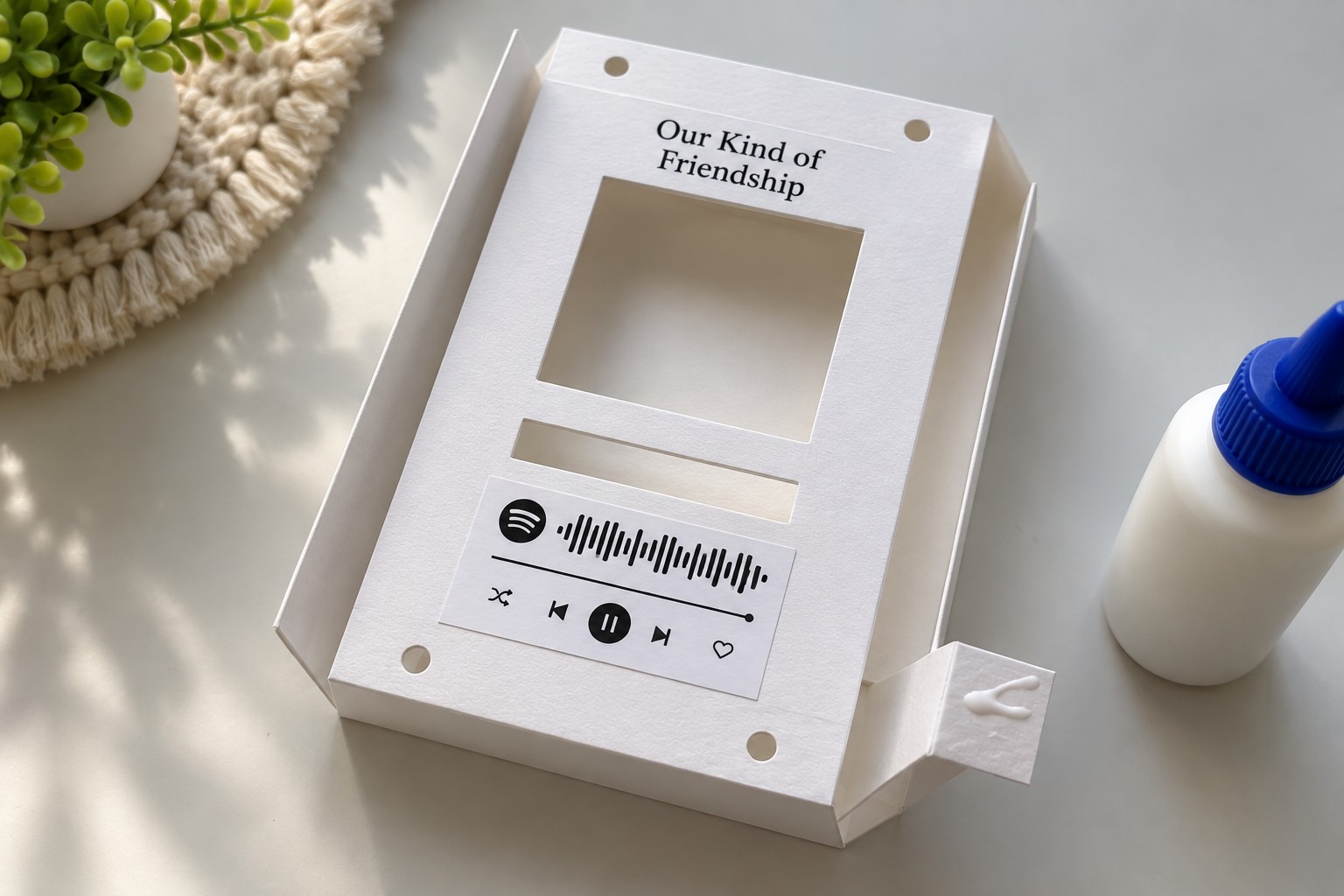
Once the cuts and alignment are confirmed, complete the visible design.
Add a simple title above the photo opening. For this friendship version:
Our Kind of Friendship
works well because it feels more personal than a generic playlist label.
Attach the Spotify Code beneath the song-title opening.
Keep the code completely flat. A glue stick or very thin double-sided tape is preferable here because excess liquid glue can wrinkle the printed code.
Below the code, draw or attach simple music-player elements:
- Progress line
- Previous button
- Play/pause button
- Next button
- Optional shuffle or repeat symbol
Now fold the previously scored side walls inward.
Apply a thin bead of PVA only to the structural tabs .
Press the corners together until the shallow box holds its shape.
Do not allow glue to spread near the roller holes. Dried glue in these areas can prevent the wooden dowels from rotating smoothly.
Allow the structure to become firm before installing the mechanism.
5. Install the First Roller and Start the Photo Strip
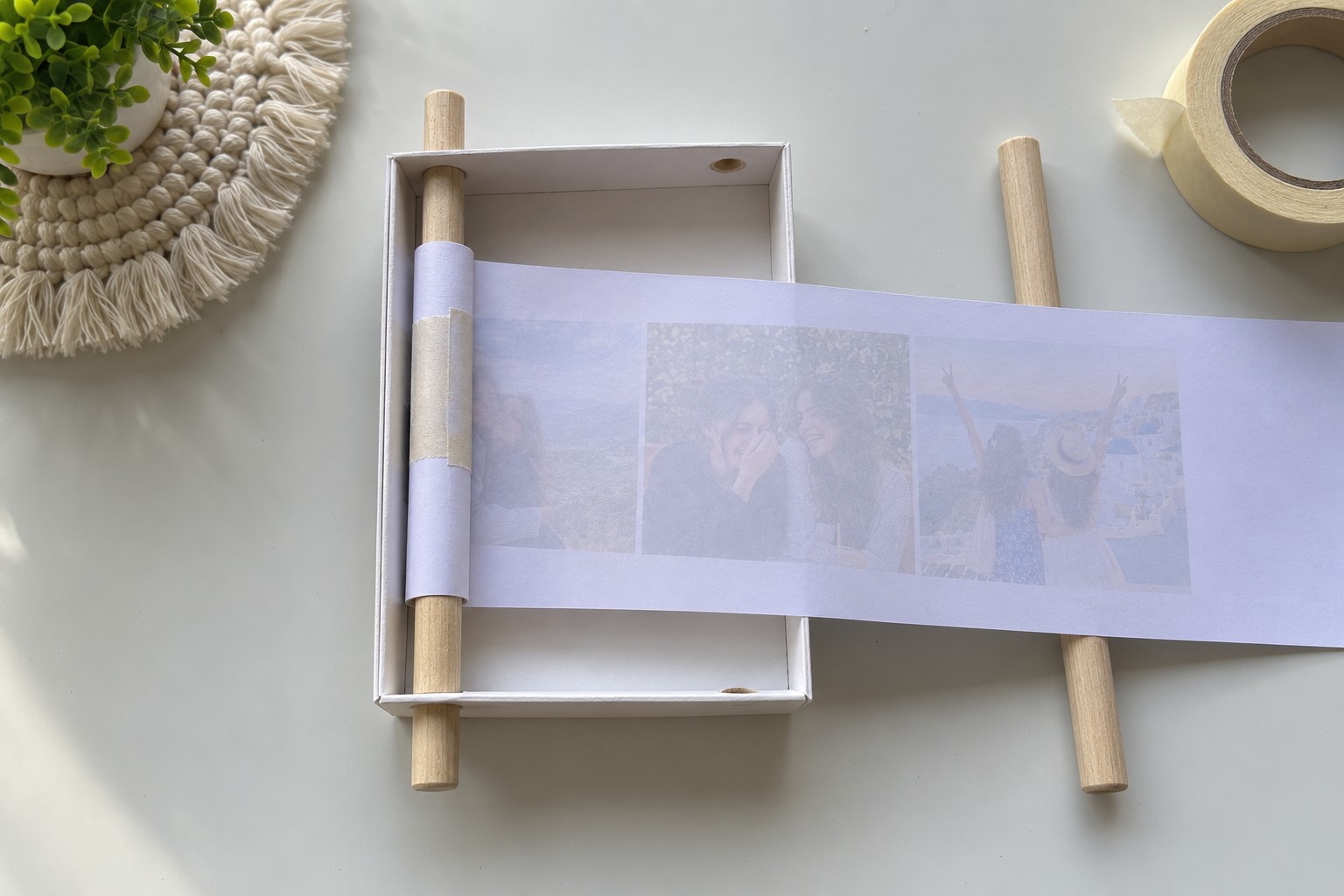
Insert the first wooden dowel vertically through the upper and lower holes on one side of the housing.
The dowel should protrude slightly from both the top and bottom.
Do not glue the wooden rod into the holes.
It needs to rotate.
Take one blank end of the printed photo strip and place it against the dowel.
Secure the blank leader to the wood using a short piece of thin masking tape or paper tape.
The tape should lie flat.
Avoid thick hot glue or bulky adhesive because any bump on the roller will make the paper wind unevenly.
Wind several turns of the blank leader around the dowel.
The printed strip should then exit the roller and travel horizontally across the interior of the frame .
The photographs do not move vertically.
The roller is vertical; the paper movement is horizontal.
6. Attach the Second Roller and Set the Tension
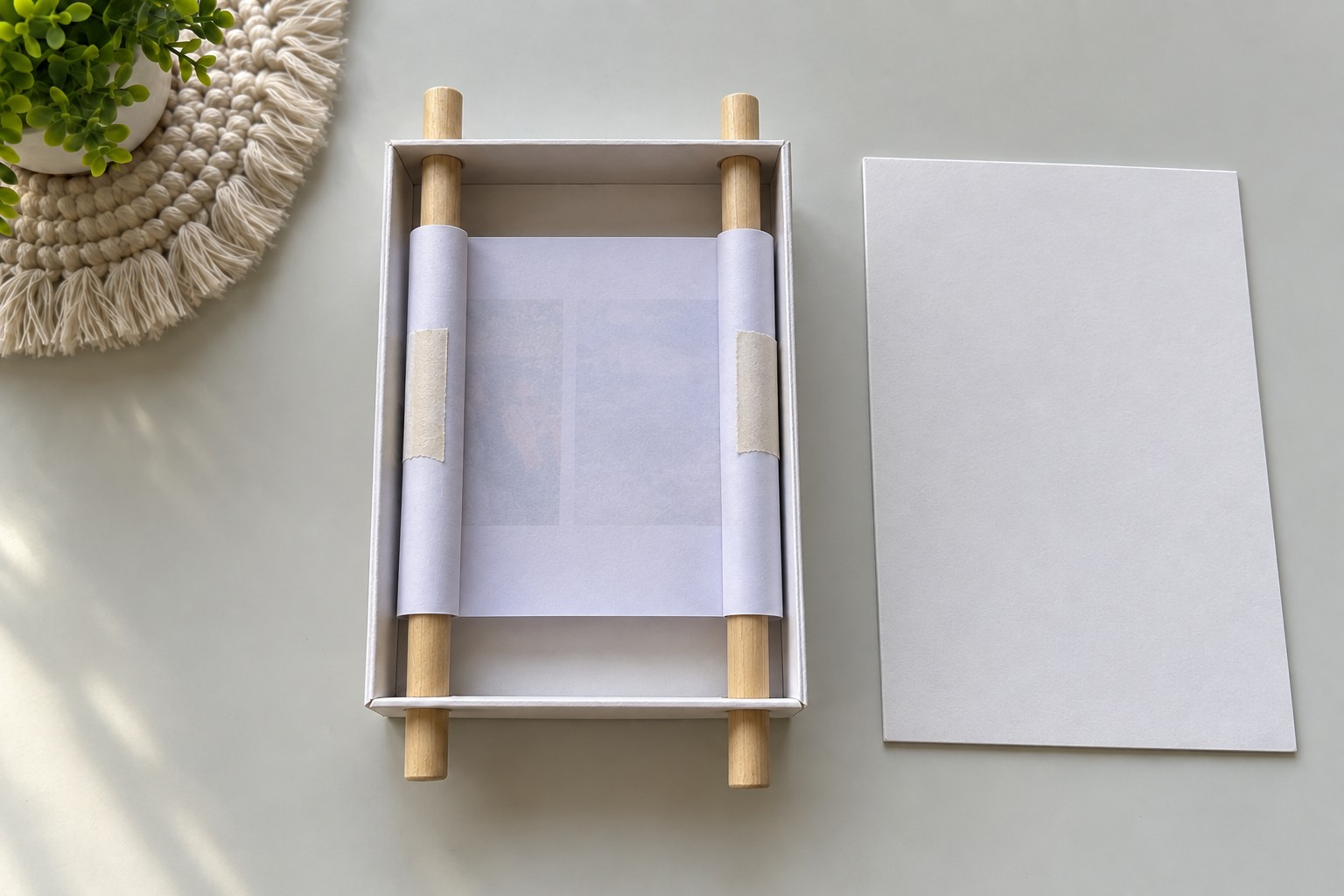
Insert the second wooden dowel through the opposite upper and lower holes.
Pull the photo strip gently across the center of the frame.
Keep its upper and lower edges horizontal.
Attach the second blank leader to the second dowel with masking tape.
Both rollers should now be vertical, one at the left and one at the right.
The printed strip runs directly between them.
Wind the second dowel slightly until the paper sits flat.
The correct tension is firm enough to prevent sagging but loose enough that both dowels can rotate easily.
Check the alignment before closing the frame
Rotate one dowel slowly.
Confirm that:
- The photographs travel horizontally
- Each photograph stops in the center of the square opening
- The corresponding song appears in the lower slot
- The paper does not rub against the top or bottom edge
- The strip does not creep diagonally
- Both rollers remain parallel
If the strip begins moving upward or downward, it was probably taped to one dowel at a slight angle.
Remove that end and reattach it squarely.
A straight first wrap is one of the most important details in the entire mechanism.
7. Close the Back and Finish the Gift
Once the mechanism works correctly, prepare the plain cardstock back panel.
Before applying adhesive, rotate the strip from the first photograph to the last and back again.
Nothing should catch inside the housing.
Apply a narrow line of PVA or thin double-sided tape only around the fixed outer edges of the frame.
Do not place adhesive near:
- The wooden rollers
- The moving strip
- The roller holes
Position the back panel and press it into place.
Keep the finished frame flat while the adhesive cures.
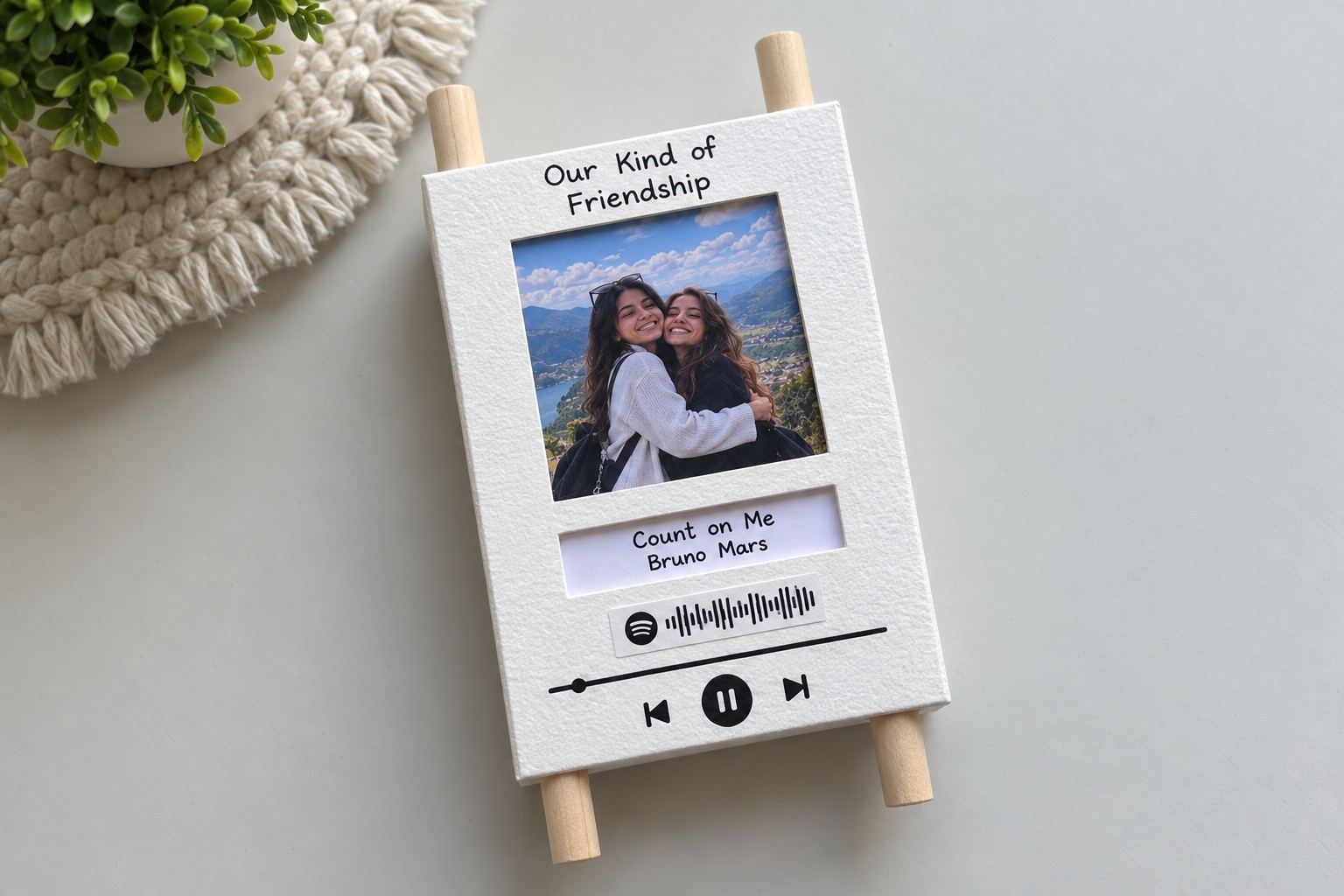
The two wooden dowels should remain visible above and below the finished housing.
These exposed ends function as the controls.
Turn one dowel to advance the photographs. Turn the opposite roller to rewind them.
When properly aligned, one photograph appears in the large square window while its matching song title and artist appear immediately below.
For the first photograph, the finished display can read:
Count on Me
Bruno Mars
with the matching friendship photo visible above.
How the Photo Scroll Mechanism Works
The project uses the same principle as a two-reel paper scroll.
One wooden dowel stores part of the paper strip while the opposite roller collects it.
When one dowel rotates, paper unwinds from one side and wraps around the other.
Because the rods are vertical, the image strip travels left to right or right to left through the frame.
This is why the photographs must be arranged horizontally on one long strip.
It also explains why both dowels must remain parallel.
Even a small alignment error can cause the paper to climb toward the top or bottom of the frame.
Troubleshooting the Moving Photo Strip
| Problem | Cause | Fix |
|---|---|---|
| Strip moves diagonally | Leader attached crookedly | Reattach it square to the dowel |
| Roller feels tight | Hole too small or glue reached it | Carefully increase clearance |
| Paper sags | Insufficient tension | Rewind slightly before securing |
| Paper will not roll | Strip too thick | Use 120–160 gsm matte paper |
| Song title does not align | Incorrect print spacing | Adjust the digital strip layout |
| Photos rub against frame | Strip too tall | Trim the upper or lower white margin |
| Roll becomes bulky | Paper is too heavy | Switch to thinner matte stock |
| Spotify Code will not scan | Print too small or distorted | Reprint and scan-test before attaching |
Important Assembly Details
The wooden dowels are not glued to the frame . They must remain movable.
The photo strip attaches only to the wooden rollers through its blank end sections.
The front and rear cardstock panels are stationary.
The moving strip must never be glued to the inside walls.
Use liquid glue only for the cardstock structure. Use thin tape for the moving mechanism.
The final project should therefore have four distinct functional parts: the stationary front panel, the stationary back panel, two freely rotating vertical dowels, and one horizontal moving photo-and-song strip.
When these elements remain separate, the mechanism stays simple, repairable, and much less likely to jam.
Making the Gift More Personal
The strongest version of this project is not necessarily the one with the most photographs. A smaller sequence of carefully selected memories often feels more meaningful.
Choose photographs that represent different parts of the friendship and pair each one with a song that has a genuine connection to that memory.
A travel photograph can correspond to a song played during the trip. A candid laugh can use a track both friends associate with school, college, or everyday time together. The Spotify playlist then becomes an extension of the physical gift rather than simply decoration.
The result is a compact handmade keepsake that combines photographs, music, and a simple mechanical interaction: turning the wooden roller gradually moves the friendship story through the frame, one memory and one song at a time.


Leave a Reply